🎉 Official Directory Listing: ClariRec is now officially featured in the PopClip Extensions Directory, listed on PopClip’s Newest Extensions catalog, and categorized under Language & Translation. The extension is 100% open-source and contains zero executable binaries.
PopClip is a beloved macOS utility that puts a lightweight, contextual action bar right next to your cursor whenever you select text with your mouse or trackpad.
With the ClariRec Official Extension, your PopClip bar gains an instant Translate with ClariRec action. Select text in Safari, Chrome, Mail, Slack, a PDF viewer, or code editor, click the ClariRec icon, and the translation appears immediately in ClariRec’s compact Mini HUD beside your cursor — without stealing application focus or interrupting your flow.
Installation
You can install directly from the PopClip Extensions Directory or use PopClip’s signature plain-text snippet selection method.
Option 1: Official Directory Install (Recommended)
- Install from the Web Directory: Visit the Official ClariRec PopClip Extension page and click Add to PopClip.
- Direct Package Download: Alternatively, download the extension package directly: ClariRec.popclipextz (Official Download). Double-click the downloaded file and PopClip will prompt you to install.
- The extension is built directly from our GitHub open-source repository, ensuring complete transparency and security.
Option 2: Plain-Text Snippet (Select to Install)
PopClip supports plain-text snippets. Simply select the entire code block below (including the # popclip header line) with your mouse. PopClip’s bar will appear with an Install Extension “ClariRec” button — click it to install instantly:
Method A — macOS Service (Recommended)
Invokes ClariRec’s built-in macOS Service. It works seamlessly even when ClariRec is running in the background.
# popclip
name: ClariRec
icon: symbol:translate
service name: Translate with ClariRec
Method B — URL Scheme
Sends the selected text to ClariRec via its clarirec:// native URL Scheme. The translation result appears in the Mini HUD and is automatically copied to your clipboard ready for pasting (⌘V).
# popclip
name: ClariRec
icon: symbol:translate
url: clarirec://translate?text=***
Note: Both methods automatically utilize whichever translation engine you configured inside ClariRec (including macOS 15+ System Translation, the on-device HY-MT2 model, or your BYOK cloud providers like DeepL, OpenAI, or SiliconFlow).
How It Works
Using the extension in your daily workflow takes just three simple steps:
- Select Text: Highlight any phrase, sentence, or paragraph in any macOS app.
- Click ClariRec: When PopClip appears, click the ClariRec translation icon.
- View Result in Mini HUD: ClariRec’s Mini HUD floats right next to the selection with a streaming translation.
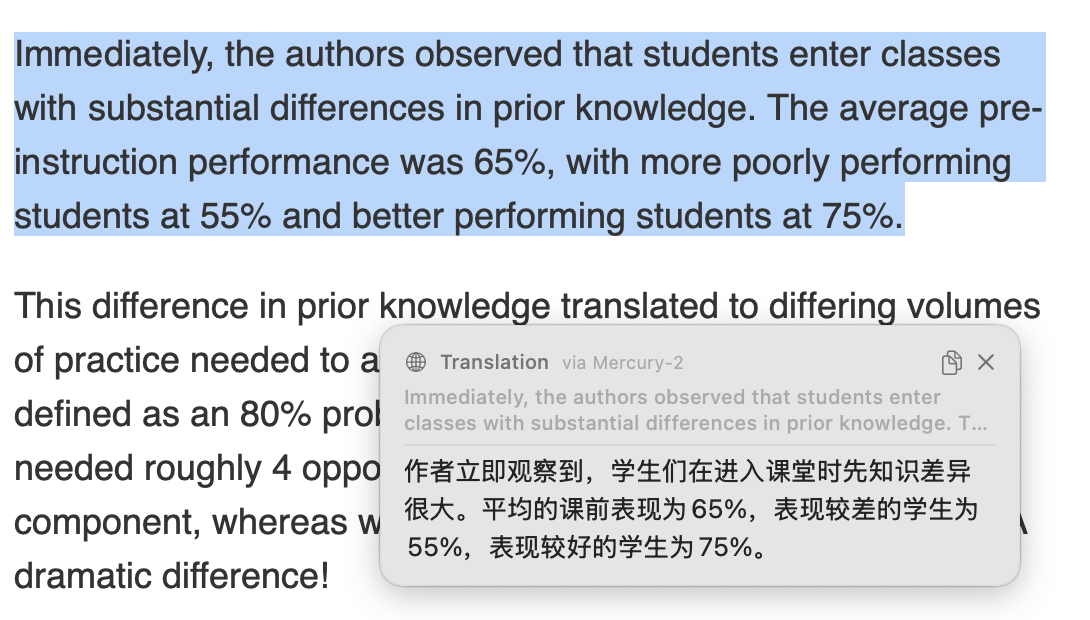
- Non-Intrusive: Doesn’t steal focus from your active document. Dismisses smoothly when you click away or resume typing.
- Copy & Expand: Quickly copy the translation or toggle the full window if needed.
Architectural & Privacy Advantages
ClariRec is built from the ground up with local-first privacy in mind. The PopClip extension adheres strictly to the same standard:
- 🛡️ Zero Accessibility Permissions: Communicates via standard macOS Services. Neither PopClip nor ClariRec requires broad Accessibility privileges to read your entire screen, complying with strict App Store sandboxing rules.
- 📦 Pure Configuration File: Contains only a minimal
Config.yaml. No scripts, no binary executables, and zero attack surface. - 🔒 Local & Offline Privacy: The extension makes zero network calls. When paired with macOS System Translation or ClariRec’s on-device models, text remains strictly on your Mac’s Apple Silicon Neural Engine — confidential documents and sensitive source code never leave your device.
Requirements
- PopClip for Mac: Download a free trial or purchase from the PopClip Official Website or the Mac App Store.
- ClariRec for Mac: Install ClariRec free from the Mac App Store.
- Ensure at least one translation engine is active in ClariRec (macOS 15+ System Translation is enabled out of the box).
Don’t Have PopClip?
ClariRec works independently without PopClip. You already have built-in ways to translate selected text on macOS:
| Method | How | Highlights |
|---|---|---|
| macOS Services Menu | Select text → Right-click → Services → Translate with ClariRec | Built into all standard macOS apps |
| System Hotkey | Bind a custom hotkey in System Settings (e.g. ⌥⌘T) |
Keyboard-driven instant Mini HUD |
| ⌥T Clipboard Hotkey | Copy text (⌘C) → Press ⌥T |
Works with any copyable text |
For more details, see our guide: Translate Selected Text on Mac.
Explore More
- PopClip Official Website (PopClip.app)
- PopClip Extensions Directory
- ClariRec on PopClip Directory
- ClariRec PopClip Extension GitHub Repo
- Screenshot OCR for Mac · Offline Translation · LaTeX Formula OCR